
Appearance

Edge Estimating APIs
Edge Estimating API provides programmatic access to Edge's Estimating Product. Built on modern REST principles, the API enables developers to integrate core estimating workflows directly into their applications and workflows.
Products
Within the developer portal APIs are bundled within a product. Products are grouped to focus on a grouping of like functionality. Depending the permissions granted by the Edge team may only be granted limited access to the available products and the APIs within.
To access the Edge API, a subscription key is required. Subscription keys will be scoped to limit access based on the need. The API Support team administrates these subscription keys by providing a primary and secondary key during onboarding. Separate keys will be needed to access sandboxes and production.
Your subscription key will be required as either a header or query parameter to each API request in addition to the Bearer token.
Open API Specifications (OAS v3.x)
During the Commercial Evaluation phase, someone from your organization will be given access to the Developer Portal where you can view our OpenAPI specifications. You may download the specifications from the API details page by clicking the "API definition" dropdown and clicking on the Open API version you want to download.
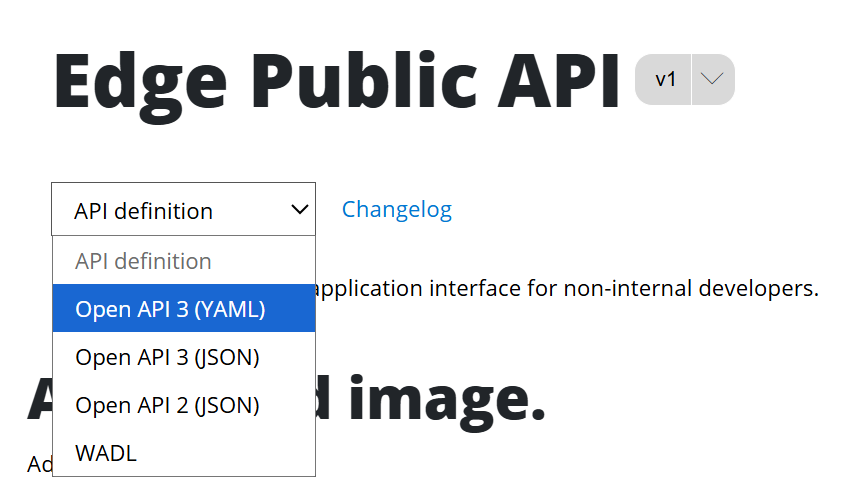
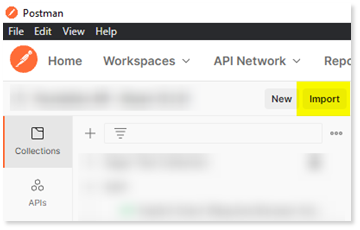
The document downloads automatically to your browser download folder. You can import this document into any tool that support importing Open API Specification.
Versioning
The Edge API is versioned using Path Versioning.
There could be breaking changes to the APIs. Breaking changes will be communicated in close collaboration with our development team. Breaking changes will be released with a new version of APIs and may become available at the path level.
For example, Edge API endpoints follow the version in the path like:
../edgepublic/v1/...
If the Edge software team plans a breaking change advanced communication will be provided, and that endpoint will be updated with the new version on a schedule.
Authentication
Edge API uses OpenID Connect Core 1.0 through Azure Active Directory Business to Consumer (B2C) to provide secure logins for Edge clients.
Authentication Basics
All current authentication methods require a user to log in to authorize an integration before changing Edge data. This means integrators are required to use a web portal that redirects to your application.
Desktop Applications
If you have a desktop application integration, you need to use a web view or web application to retrieve a Edge API access token for your desktop integration.
In addition to your bearer token, Edge API endpoints require a connection guid to also be provided. Located in the Edge Core API is an endpoint called “List Cloud Clients”. This endpoint allows an authenticated user to provide their CRM client id, which is provided by Edge, and it will return to you a casConnectionGuid. This connection guid is required to be provided as a header for subsequent requests.
TIP
Located in the List Cloud Clients endpoint API documentation are additional details describing how to obtain this connection guid.
TIP
Connection guids can be rotated periodically for security purposes, so it is recommended that each time you create a new Edge API session that you pull the most current connection guid and not locally store this value.
Client Credentials Flow
Applications integrating by a background process use the Client Credentials grant flow. In this flow, an authorization request is made as a confidential application instead of a user. To use this flow your application must be confidential or have secured access to a confidential client.
Application Types
| Public Clients | Confidential Clients |
|---|---|
| Desktop apps | Backend-driven web applications |
| Mobile apps | Web APIs |
| Wearable apps | Serverless Functions |
| Single-page web applications | Web daemons and services |
If your application is one of the types on the left, it must implement a user flow such as the Code Grant Flow. However, if your public application already has a user flow, and authenticates that user with a confidential client, you could then use that confidential client to implement the Client Credentials flow. This would enable you to make requests that flow through the user interface of your public client to your confidential client and perform background processes using your confidential client. A popular use case of this would be a Web Application communicating with a Web API.
If you are not able to authenticate as a confidential client, please contact (800) 811-5926 and request the ability to use the Code Grant Flow as an alternative for public clients. Authentication security will be reviewed as part of the Integration Review step in the Onboarding Process.
Sample Request
bash
curl --location --request GET \
'https://fslenterprisedr.b2clogin.com/fslenterprisedr.onmicrosoft.com/B2C_1A_CAS_SIGNIN/oauth2/v2.0/token' \
--header 'Content-Type: application/x-www-form-urlencoded' \
--data-urlencode 'grant_type=client_credentials' \
--data-urlencode 'scope=https://fslenterprisedr.onmicrosoft.com/foundation/.default' \
--data-urlencode 'client_id={{MyApplicationId}}' \
--data-urlencode 'client_secret={{MyClientSecret}}'
Authorization Code Grant Flow
The Authorization Code Flow for Edge API enables secure two-step access to Edge resources with the resource owner's permission.
We recommend Microsoft's documentation for successfully getting an access code, exchanging it for an access token, and refreshing the access token.
Required Parameters
You need the following information to follow the authorization code flow guide:
{tenantId} = fslenterprisedr
{policy} = B2C_1A_CAS_SIGNIN
client_id = {Your clientId provided in your Welcome Package}
redirect_uri = {your URL Encoded redirectURI you provided to the Edge API Support Team}
scope = openid%20https%3A%2F%2Ffslenterprisedr.onmicrosoft.com%2FFoundation%2Ffoundation.access
Note:
Replace the sample values above with your actual tenant, policy, client ID, and redirect URI before using in production.
Redirect URL
Redirect URL Configuration
If the redirect URL is new or different from the one(s) you provided during onboarding, you need to contact Edge API Support at (800) 811-5926 to have an additional redirect URL added.
For sandbox testing, we provide the redirect URL https://jwt.ms to enable you to test before you have the redirect working properly.
Authentication Libraries
There are numerous front-end libraries available for implementing OAuth 2.0 and OpenID Connect.
Microsoft's libraries provide an API for several popular programming languages including:
- Java
- Go
- Native mobile application languages
- JavaScript/TypeScript
If you do not see your language listed in the libraries Microsoft provides, we recommend searching for a set of authentication libraries in your own programming language before writing custom code.
Additional Libraries
There are numerous front-end libraries available for implementing OAuth 2.0 and OpenID Connect. We recommend searching for an open source set of authentication libraries in your own programming language before writing custom code.
JavaScript Example
If you are using a JavaScript application, Microsoft provides some open-source examples for the code grant flow.
Your First API Call
After you have authorized your first test user and received an auth token, you can try out our APIs by visiting the documentation on the Edge API site.
Example: Get Cost Codes
Let's get some cost codes belonging to your sample client:
bash
curl -v -X GET "https://api-sandbox.foundationsoft.com/foundation/v1/costcodes" \
  -H "Cache-Control: no-cache" \
  -H "Authorization: Bearer {yourToken}"
You should receive the response payload with a 200 status code:
json
[
  {
    "costCodeGroup": {
      "costCodeGroupId": null,
      "description": null
    },
    "wcClass": {
      "wcClassId": null,
      "description": null
    },
    "isActive": true,
    "costCodeId": "1",
    "description": "GENERAL COSTS",
    "costCodeGroupId": null,
    "wcClassId": null
  }
]
Rate Limiting
The Edge Partner API uses rate limiting to optimize performance and security for integrations.
Current Rate Limit
500 requests per minute per client
Client-Based Limits
The rate limit is applied to the client, not the integration. For example, if MyIntegration has 10 mutual clients with Edge, and the 10 clients all use the app at the same time, they each have an individual rate limit of 500 per minute.
Prevent Excessive Failures
Once a client reaches the rate limit, the API will return a 429 response.
Security Alert
Too many calls returning a 429 may be identified as a security threat, resulting in the integration being blocked and an investigation being conducted.
To prevent this, design the integration so that once the rate limit is reached, future calls are postponed until the rate limit resets. Consider using a circuit breaker pattern with a cached time to resume requests.
Rate Limit Headers
The following headers are returned on any API call:
| Header Name | Value | Description |
|---|---|---|
X-RateLimit-Limit | 500 | The total number of allowed requests |
X-RateLimit-Remaining | 0-499 | The number of calls remaining until the rate limit will be reached |
After the rate limit is reached, the following header is returned:
| Header Name | Value | Description |
|---|---|---|
X-RateLimit-Reset | The time in milliseconds at which the rate limit will reset |
Need Help?
For questions during development, please call (800) 811-5926 for support.
Site v5.6